


Rush Tiles: Rhythm Music Piano
4.07.00 Reviews
App Specs
- Version
- 1.0.31
- Updated On
- License
- Free
- Downloads
- 1,000,000+
- Developer
- iMusic Game
- Categories
- Music
- Platform
- Android
Screenshots




 Analysis by AppCompare
My first reaction to Rush Tiles: Rhythm Music Piano was that it wants to make a familiar little habit feel like a game: hearing a tune and tapping along before you even notice you’re doing it. Here, that impulse becomes the main activity. You follow piano-style tiles with quick taps, and the pleasure comes from keeping your hands in step with the music as the pace asks more of you. It is a simple idea, but a good fit for a short break when I want something more focused than scrolling and less involved than learning a full game.
That simplicity also sets the right expectations. This is a music game, not a piano lesson or a tool for practising songs on a real keyboard. I would recommend it to someone who enjoys rhythm challenges and wants an easy way to test their timing. If your goal is to learn notes, technique, or how to play a particular piece, a music-learning app or an actual keyboard will serve you better.
First Impressions: A Quick Route Into the Rhythm
When I first downloaded Rush Tiles: Rhythm Music Piano, I wasn't sure what to expect. The app’s sleek and modern interface immediately caught my eye. With a simple tap, I was whisked away to a world of music and rhythm. Setting it up was a breeze, and within minutes, I was ready to play.
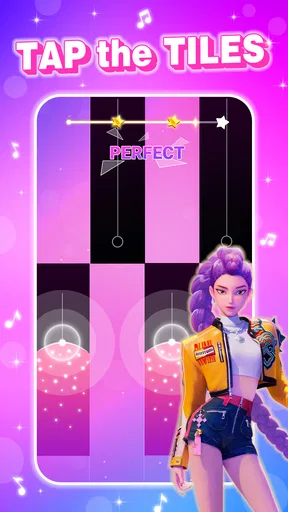
The game kicks off with a quick tutorial, easing you into the basics. Even if you’re not a seasoned gamer, you’ll find the controls incredibly intuitive. Essentially, your fingers are your instruments, tapping the tiles as they scroll down the screen in time with the music. Miss a beat, and you'll need to start over, but hit all the notes, and you’re in for a rewarding musical experience.
Who Will Enjoy This Kind of Music Game?
I see the strongest fit for people who like quick reflex games, familiar piano-led sounds, and a clear goal they can understand at a glance. You do not need music theory to begin; the challenge is following what appears on screen and responding at the right moment. That makes it approachable for a casual player, while the rising demands can give a more competitive player something to practise.
There is a useful distinction between “I like music” and “I want to play a music game.” A listener who wants to choose an album and relax without touching the screen may find this too demanding. Someone who likes to actively tap along, repeat a tricky passage, and see whether their timing improves is more likely to enjoy it. I would also avoid treating a strong run as proof of piano skill: the game tests coordination and rhythm in its own format, not performance on an instrument.
Gameplay: A Symphony of Fun
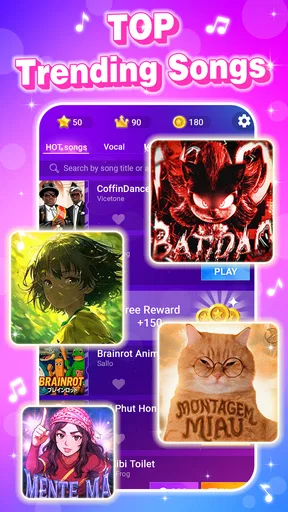
Let’s dive into the heart of the game: the gameplay. What I love most about Rush Tiles: Rhythm Music Piano is its ability to keep you on your toes. With various levels and songs to choose from, the game offers something for everyone. Whether you're into classical music or pop hits, there's a track that will get your fingers moving.
Worth Reading Before You Choose

EA SPORTS FC Mobile 26 Is a Bigger Football Game, but It Takes Time

Flipboard Shows What News Apps Must Do Beyond the Feed

Switching to Android Auto Means Rethinking Your Driving Routine

Google Calendar Makes a Crowded Week Easier to Manage

Ludo King Makes the Most of the Minutes Between Plans

Baby Panda World Brings Quick Play to Modern Phones, but Its Game Library Feels Busy
The game’s difficulty gradually increases, which I found both challenging and exhilarating. Starting with simpler songs, you’ll soon find yourself tackling more complex compositions. The thrill of mastering a difficult song is unmatched, and the game does a fantastic job of rewarding players with satisfying sound effects and visual feedback.
A Practical Way to Fit It Into a Day
A realistic time to play is the few minutes between errands, during a quiet break, or while waiting for someone who is running late. I would choose a song that feels manageable, play with the phone held steadily, and treat the first attempt as a warm-up rather than a verdict on my reflexes. If a run ends quickly, that is a cue to slow down and focus on the next sequence, not to tap harder or rush ahead.
For a fair comparison, I would try the same track again when I am not distracted. A noisy room, a conversation, or divided attention can make a timing game feel harder than it is. On the other hand, repeatedly replaying a difficult section while tired can turn a playful challenge into frustration. Short sessions work better for this style: I can stop while I still want another attempt instead of chasing a perfect run long after the fun has faded.
Sound and Rhythm: Listening Is Part of the Play
The music is not merely background decoration; it gives each run its pulse. I find it helpful to watch the tiles while also listening for the beat, because looking only at the screen can make every tap feel like a visual reaction test. Letting the sound guide the rhythm can make a sequence feel more coherent, especially once the pace picks up. If I am playing somewhere I need to stay quiet, I can still use the visual timing, but the experience loses some of its musical character.
That trade-off matters when deciding where to play. A brief session with sound on can feel more involving, while a silent session is more discreet but asks me to depend more heavily on what I see. I would not use it as background entertainment while doing something else: the moment-to-moment tapping rewards attention, and splitting that attention is likely to make the music feel less satisfying as well as the game less forgiving.
Features That Make It Stand Out
Now, let's talk about the features that make this app a must-have. Firstly, the sound quality is top-notch. The music is crisp, and each note resonates perfectly, making you feel like you’re playing on an actual piano. Plus, the library of songs is constantly updated, ensuring that you'll never get bored.
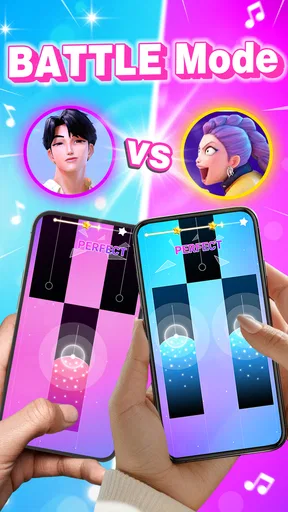
The app also boasts a variety of modes, including a challenge mode where you can compete against friends or other players worldwide. This competitive edge adds an exciting layer to the game, pushing you to improve your skills and climb the leaderboards.
How It Sits Beside Other Rhythm Games
Compared with a conventional rhythm game built around drum hits, long notes, or a complex song chart, this piano-tile approach keeps the action visually direct: the task is to follow the descending tiles and tap in time. That makes it easier to understand at first glance, but it also means the appeal is concentrated in timing, repetition, and hand-eye coordination rather than a broad set of musical controls. If I wanted a deeper simulation of playing an instrument, I would choose a different kind of app; if I wanted a quick touch-screen challenge with a musical frame, this is closer to what I would reach for.
The competitive side is best treated as extra motivation, not the only reason to play. A score or challenge can give a replay a purpose, but chasing other players is not for everyone. I would enjoy it most by trying to improve my own consistency first, then using competition when I wanted a more demanding target. That approach keeps the game enjoyable even when I am not in the mood to compare results.
Visuals and User Experience
Visually, Rush Tiles: Rhythm Music Piano is a treat. The graphics are vibrant without being overwhelming, striking a perfect balance between style and simplicity. The animations are smooth, and the interface is user-friendly, making navigation a breeze.
One of the highlights is the customizable themes and backgrounds, allowing you to tailor the game’s appearance to your liking. Whether you prefer a dark, moody theme or a bright, colorful one, the app has you covered.
Small Choices That Make a Session Better
I would keep the phone at a comfortable angle and make sure my hands are not cramped before starting a faster song. That sounds obvious, but cramped fingers make it harder to distinguish a genuine timing mistake from an awkward reach. I also prefer to play when I can give the screen my full attention; trying to tap one-handed while carrying something or walking is a poor test of the game and an easy way to turn a harmless session into a distraction.
Another practical choice is to treat difficulty as a pacing decision, not a dare. If a song feels too quick, going back to a more comfortable one can help me settle into the beat before attempting it again. The point is not to force progress every time I open the game. For a game built around repeated taps, having the option to stop after a satisfying run is part of what makes it work as a casual pastime.
What to Expect Before Downloading
The game is free, rated for Everyone, and developed by iMusic Game. It has an average rating of 4.2 from around 960 ratings, with more than a million installs. It first appeared on August 25, 2024, and version 1.0.30 supports Android 8.0 and later. Those details make it easy to judge basic compatibility and audience suitability, but the more important question is whether you want a game that asks for active, repeated attention rather than passive listening.
If you are choosing between this and a more elaborate music game, think about what you want from each session. This is a sensible pick when you want a straightforward screen-based rhythm test without learning a complicated control scheme. A music-learning app is the better choice for structured practice, while a music player is better when you want songs to accompany another activity. I would skip this one if repeated attempts, quick visual reactions, or tapping along to a track sounds like a chore rather than a welcome distraction.
Atmosphere Verdict: A Focused Little Break
In conclusion, Rush Tiles: Rhythm Music Piano is more than just a game; it's an experience. It’s perfect for those moments when you want to unwind while still engaging your mind and reflexes. Whether you’re a music enthusiast or just looking for a fun way to pass the time, this app hits all the right notes.
So, what are you waiting for? Head over to your app store, download Rush Tiles: Rhythm Music Piano, and let your fingers dance to the rhythm of your favorite tunes. Trust me, you won’t regret it!
Pros
- Engaging rhythm-based gameplay.
- Wide variety of music tracks.
- Intuitive touch controls.
- Visually appealing graphics.
- Frequent updates with new content.
Cons
- Ads can be intrusive.
- Limited offline play options.
- Some tracks require purchase.
- Occasional lag in gameplay.
- Not suitable for all music tastes.
FAQs for Rush Tiles: Rhythm Music Piano
What is Rush Tiles: Rhythm Music Piano and how does it work?
Rush Tiles: Rhythm Music Piano is a music-based game where players tap on tiles in sync with the rhythm of popular songs. The game challenges your reflexes and timing as you progress through various levels with increasing difficulty. The objective is to achieve the highest score by accurately hitting the tiles in rhythm.
Is Rush Tiles: Rhythm Music Piano suitable for all ages?
Yes, Rush Tiles: Rhythm Music Piano is designed for players of all ages. Its intuitive interface and simple gameplay mechanics make it accessible for young children, while the challenging levels can also entertain adults. The game offers a family-friendly experience with a wide variety of songs to suit different musical tastes.
Can I play Rush Tiles: Rhythm Music Piano offline?
Rush Tiles: Rhythm Music Piano requires an internet connection to download new songs and updates. However, once the songs are downloaded, you can play them offline. This feature allows you to enjoy the game anywhere without worrying about connectivity issues, as long as you have previously downloaded the desired tracks.
Are there in-app purchases available in Rush Tiles: Rhythm Music Piano?
Yes, Rush Tiles: Rhythm Music Piano offers in-app purchases. Players can buy additional songs, remove ads, or acquire special items to enhance their gaming experience. While the game is free to download and play, these purchases offer optional enhancements for those looking to expand their music library or enjoy an ad-free experience.
How can I improve my performance in Rush Tiles: Rhythm Music Piano?
To improve your performance in Rush Tiles: Rhythm Music Piano, practice regularly to get familiar with the rhythm and timing of different songs. Focus on eye-hand coordination and try to anticipate the next tile. Starting with slower songs can help build your skills before tackling more challenging tracks. Additionally, adjusting the sensitivity settings might enhance your gameplay precision.


